How to connect a podcast RSS feed to every listening platform
Podcast rss feed distribution setup in 2026: submit one feed to Apple Podcasts, Spotify, Amazon Music and YouTube Music, with fixes for common rejections.
.svg)
.svg)
Your podcast RSS feed is the single source every listening app pulls from. Connect it once to each directory, and every new episode you publish in 2026 appears everywhere without re-uploading.
TL;DR
Manual uploading to each app means five dashboards, five sets of artwork rules and five chances to ship a mismatched episode. One RSS feed removes that. You publish at your host, and every directory picks the episode up.
The feed is also where most distribution failures start. A bad image size, a missing category or an unreachable owner email stops approval cold. Fix those before you submit anywhere.
If you want the recording and editing side handled before the feed ever matters, Dialed Studios runs done-for-you podcast production in Denver with a guaranteed 48-hour editing turnaround. This guide covers what happens after the final file exists.
Keep your cover art square, in JPG or PNG, and within the size range your host and Apple Podcasts specify. Artwork rejection is the most common cause of a failed first submission.
Expected result: a page of structured text showing your show title, description and episode entries. If you see a login screen or a 404, the feed is not public yet.
Expected result: your show appears with a status of Processing, then moves to Published once Apple approves it. Apple's own timeline varies, so check the status inside Connect rather than waiting on a fixed number of days.
Expected result: the show goes live in Spotify and episodes appear after each publish on your host.
Both follow the same pattern. Paste the feed URL, verify ownership, confirm metadata.
If your goal on YouTube is video rather than audio-only, read how to connect podcast episodes to YouTube distribution. It covers the video side the RSS route does not.
Expected result: each platform shows your show as live or pending review. Keep a short record of each submission date and the login you used.
Other apps read the same feed. Most need only the URL and an ownership check. Many pull from Apple Podcasts automatically once you are listed, so check before submitting twice. Where a directory asks for a manual submission, paste the same feed URL and confirm.
Apple Podcasts
Spotify
Amazon Music
YouTube Music
Smaller apps
You do not resubmit the feed to publish new episodes. You only touch the directories when you change something structural. That includes the show name, cover art or feed URL itself.
If you move hosts, do not paste a new feed URL into each directory. Set up a 301 redirect from the old feed at your previous host, then update the feed URL in Apple Podcasts Connect and Spotify. Subscribers and your listing history stay attached.
Once the feed is live everywhere, the next gains come from what you publish, not where.
Verdict: for podcast rss feed distribution setup in 2026, host one public feed, verify your owner email, and submit once to Apple Podcasts, Spotify, Amazon Music and YouTube Music. Dialed Studios, a Denver podcast and video production studio, delivers edited episodes within 48 hours so the feed has something to ship.
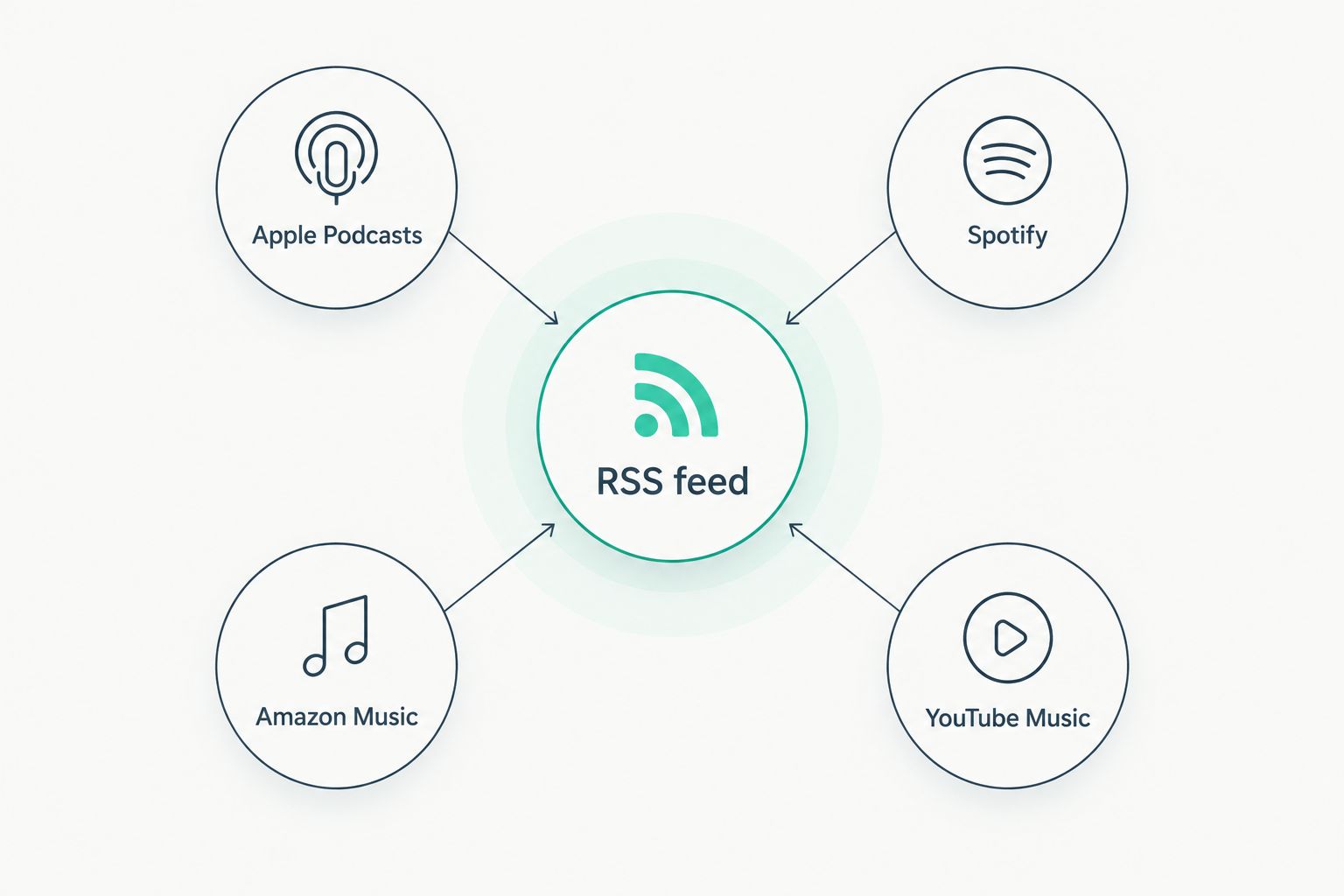
One feed supplies every directory, so you publish once.
What is a podcast RSS feed?
A podcast RSS feed is a public XML file listing your show details and episodes. Listening apps read it to display and download your podcast.
Do I need to submit my feed to every platform?
Yes, once per major directory. Apple Podcasts, Spotify, Amazon Music and YouTube Music each need a one-time submission and ownership check.
Do I resubmit the feed for every new episode?
No. After approval, directories check your feed automatically. Publishing at your host is enough.
Why is my podcast RSS feed not showing in Apple Podcasts?
Most often the feed is private, the artwork fails Apple's rules, or the show is still processing. Check the status and error messages in Apple Podcasts Connect.
Can I change podcast hosts without losing listeners?
Yes. Redirect the old feed with a 301 at your previous host, then update the feed URL in each directory. Subscribers carry over.
Where do I find my RSS feed URL?
Open your host's Distribution, Settings or RSS Feed page and copy the feed URL. Test it in a browser to confirm it loads.
Is Spotify's feed the same as Apple's?
Yes. Both read the same RSS feed URL. Only the submission dashboard and verification step differ.
Submit your feed only after you have at least three episodes live. A new listener who finds one episode has little reason to follow the show, and a short back catalog gives directories less to index. If you need those first episodes recorded and edited fast, Dialed Studios builds a fully customized branded set and assigns a dedicated producer and engineer to your show.
Get your episodes feed-ready
Done-for-you podcast production in Denver with 48-hour editing.