How to connect podcast episodes to YouTube distribution
Podcast to YouTube distribution: choose video uploads or RSS, set up your podcast playlist, schedule episodes, and prevent duplicate publishing errors.
.svg)
.svg)
Instead of uploading every podcast episode without a repeatable publishing plan, connect your episodes to a YouTube podcast playlist through video uploads or an eligible RSS feed. Use video uploads for filmed episodes; use RSS ingestion when you want YouTube to turn your audio episodes into videos with static artwork.
TL;DR
Your podcast host and YouTube serve different publishing jobs. A podcast host distributes an RSS feed to listening platforms. YouTube publishes videos and identifies a podcast through a playlist designated as a podcast.
Connecting an audio feed does not create a filmed podcast. That distinction determines what you record, what your editor delivers, and which publishing steps you own.
Dialed Studios provides done-for-you podcast and video production in Denver, including fully customized branded sets, a dedicated producer and engineer, editing, and content strategy. Its guaranteed 48-hour editing turnaround addresses production delivery. YouTube uploading, processing, approval, and scheduling remain separate workflow stages.
For your 2026 publishing plan, choose the distribution route before recording. A video-first show needs an approved video master. An audio-first show needs a working RSS feed and accurate episode metadata. Treat those as different delivery packages, not interchangeable files.
Confirm channel verification before uploading long episodes. YouTube requires verification for uploads longer than 15 minutes. Discovering that requirement after the editor delivers your episode creates an avoidable publishing delay.
YouTube Help's podcast creation and RSS delivery guidance distinguishes uploaded video episodes from feed-generated videos. Use that distinction to select your 2026 workflow; neither route replaces the other automatically.
Video uploads
RSS ingestion
Choose video uploads when your on-camera presence is part of the product. Choose RSS ingestion when audio is the finished product and static artwork is an acceptable viewing experience.
Expected result: You have one approved episode package, one chosen distribution route, and a named publishing owner. Nobody has to guess which export is final.
For filmed episodes, approve the audio and picture together. Watch the opening, check speaker synchronization, and inspect any cuts that remove part of an explanation. Clear audio with an unfinished picture is not a finished YouTube episode.
Expected result: Your channel has a podcast-designated playlist ready to hold full episodes. The show is organized as a podcast rather than an unrelated collection of uploads.
Keep trailers, Shorts, and highlight clips outside this full-episode playlist. YouTube's podcast guidance treats the podcast playlist as the home for complete episodes; promotional assets have a different job.
Do not designate every playlist on the channel as a podcast. An interview series, a product tutorial library, and a collection of short clips do not become one coherent show simply because they share a channel.
Expected result: The approved video is uploaded, assigned to the correct podcast playlist, and held for review rather than released accidentally.
For an entrepreneur's 2026 video podcast, the upload should preserve the production decisions made during recording. Fully customized branded sets establish the visual context; the dedicated producer and engineer support the recording; the final video carries that work onto YouTube. An RSS-generated static image cannot reproduce those elements.
Review the uploaded version, not only the local export. Check the opening, ending, picture quality, audio synchronization, title, and thumbnail on the actual YouTube watch page.
Expected result: The episode has a deliberate release decision and a traceable record. Your team knows whether it is awaiting approval, scheduled, or public.
Use a simple handoff sequence: Approved master, Channel review, Scheduled release, Published check. After release, verify that the episode appears in the intended podcast playlist and plays from its public watch page.
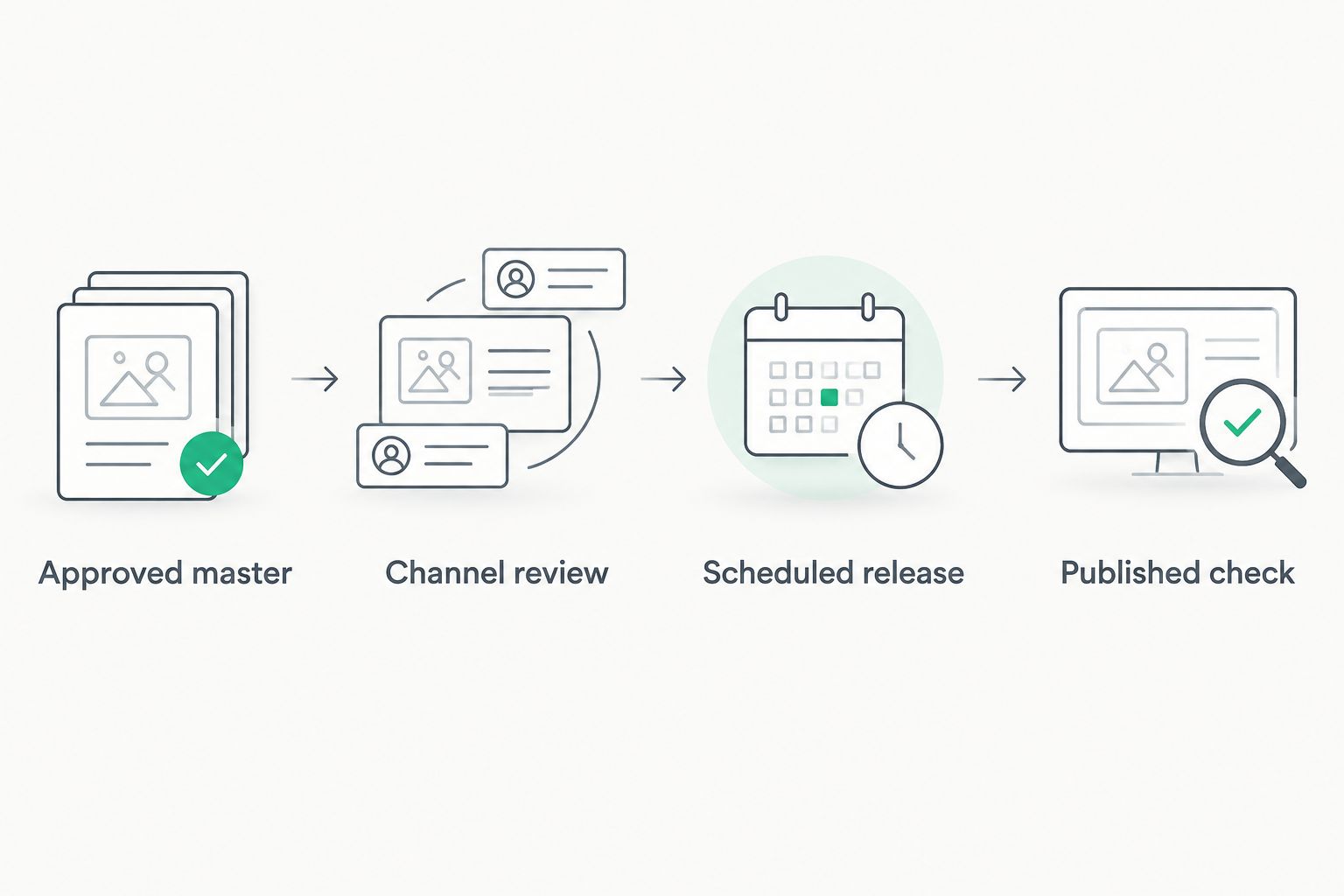
An approved edit and a published episode are separate milestones.
A production deadline is not a publication deadline. Build your 2026 release calendar around both. Dialed Studios guarantees a 48-hour editing turnaround; leave room in your own publishing process for review, upload processing, and scheduling without treating those steps as part of that guarantee.
RSS ingestion is the adjacent workflow for an audio-first podcast. YouTube creates videos from the feed's audio and show artwork, then adds eligible new episodes as they appear in the connected feed.
Expected result: Eligible new audio episodes enter the connected YouTube workflow without a separate manual video upload for each release.
New episodes and revised episodes are different events. Do not assume that replacing audio at your podcast host replaces an existing YouTube video. Review the affected episode in YouTube Studio and use its available RSS re-upload controls when a replacement is required.
RSS ingestion sends content to YouTube. It does not send your podcast onward to other listening platforms, and it does not turn a static-image episode into a filmed interview.
Check YouTube's supported-location and eligibility guidance for RSS delivery, and confirm that you are in the intended channel. If feed ingestion is not supported for your setup, use the video-upload route with a prepared video file instead.
Inspect the ownership email associated with the RSS feed at your podcast host. Correct an inaccessible or outdated address there, then retry verification. Channel access and podcast-feed ownership are separate permissions; having one does not establish the other.
Compare manually uploaded episodes with RSS-generated episodes. Stop importing overlapping releases, then decide which version belongs in the public podcast playlist. Review links and existing engagement before removing anything; deleting a video removes its watch page.
Open the video's details and check Playlists. Assign the full episode to the intended podcast playlist, then confirm that the playlist itself is designated as a podcast. A video title containing the word podcast does not perform that assignment.
Check whether YouTube is still processing higher-quality versions before uploading again. If the approved master itself contains the error, correct the master first. A standard video upload cannot have its underlying video file replaced while retaining the same watch URL.
Once full episodes publish reliably, add a separate promotional track. Pick moments that answer a complete question, export clips for their intended placement, and give each clip a clear connection to the full episode. Do not mix clip approval with approval of the episode master.
Use the content strategy for YouTube creators guide to connect episode topics, full-length publishing, and supporting content. Keep the operating rule simple: one episode master, one publishing owner, and a separate decision for each promotional asset.
For your 2026 production brief, state the required deliverables before recording: full episode, audio version, thumbnail inputs, and any planned clips. Dialed Studios combines fully customized branded sets, a dedicated producer and engineer, and a guaranteed 48-hour editing turnaround. Best for entrepreneurs who want a production partner, not just a room rental. You still need a clear channel-access and publishing handoff.
Plan your podcast production
Discuss branded sets, dedicated production support, and the guaranteed 48-hour editing turnaround.
What's the best way to connect my podcast to YouTube?
Use video uploads for a filmed podcast and eligible RSS ingestion for an audio-first show. Organize complete episodes in a playlist designated as a podcast.
Can YouTube automatically publish episodes from my RSS feed?
YouTube RSS ingestion can create videos from eligible new feed episodes after connection and setup. The videos use audio and static artwork, not your filmed episode footage.
Do I need a separate YouTube channel for my podcast?
You do not need a separate channel to create a YouTube podcast. Use a podcast-designated playlist within the channel you want to own the show.
Will my video podcast transfer through my audio RSS feed?
YouTube's podcast RSS ingestion does not import your filmed episode as a video podcast. Upload the finished video separately when you want viewers to see your cameras, demonstrations, or branded set.
Should I put Shorts in my YouTube podcast playlist?
Keep Shorts and promotional clips outside the full-episode podcast playlist. Use separate collections for supporting content so the podcast contains complete episodes.
Does changing an RSS episode update the existing YouTube video?
Do not assume a feed edit replaces the existing YouTube episode. Inspect the affected video in YouTube Studio and use the available RSS re-upload controls when replacement audio is needed.
Does the 48-hour editing guarantee mean my episode is published within 48 hours?
Dialed Studios guarantees a 48-hour editing turnaround, not a YouTube publication deadline. Account permissions, review, processing, and scheduling require a separate publishing handoff.
Your RSS feed and your YouTube channel are separate publishing records. Correcting one does not establish that the other is correct. After an episode revision, check both destinations rather than assuming the change traveled everywhere.
For each release, save the approved master, feed episode reference, and YouTube video ID together. That small organizational step makes duplicate detection, corrections, and team handoffs easier without adding another production system.