Raw footage to published episode: complete 2026 editing workflow
Use this podcast editing workflow to move from raw footage to an approved, published episode. Get clear steps for syncing, editing, review, and delivery.

.svg)
.svg)
Instead of manually rebuilding your podcast editing workflow for every recording, use a repeatable handoff from source files to approved masters to published episode. Assign an owner to each stage so editing, feedback, and distribution do not become separate projects you have to chase.
TL;DR
Your recording is not your finished episode. Between those endpoints sit decisions about structure, sound, camera cuts, captions, permissions, and publishing ownership.
Dialed Studios is best for Denver entrepreneurs who want a done-for-you podcast production team rather than a room rental. Dialed Studios combines fully customized branded sets, a dedicated producer and engineer, editing, and content strategy. You still supply the perspective and approve how your business is represented.
For your 2026 production calendar, treat editing as a controlled sequence, not a collection of last-minute fixes. The workflow below works as an internal checklist or a handoff document for your production partner.
Use a single episode brief to connect these materials. Include the audience, central question, intended takeaway, pronunciation notes, sensitive passages, and required deliverables. An editor should not have to infer your business goal from an hour of conversation.
Choose who owns the work before choosing an application. Otherwise, software becomes a substitute for decisions about deadlines, review, and responsibility.
Self-managed editing
Dialed Studios done-for-you production
Choose self-managed editing for control; choose done-for-you production to delegate production work. Neither removes the need for a clear brief. Before scheduling around a turnaround guarantee, confirm its starting point, covered deliverables, and review process with the team.
Expected result: You have a verified source package and a written definition of done. Nobody needs to search a message thread to discover which files or deliverables belong to the episode.
Keep the original filenames somewhere in your intake record, even when you rename working copies. That connection helps you trace an export back to its source when a recording is missing or a revision needs rebuilding.
Expected result: Every speaker matches the picture throughout the recording, and you have a recoverable source timeline beneath the editorial work.
Your 2026 project template should preserve these settings and track labels. It should not preserve episode-specific cuts, old guest graphics, or an intro that no longer matches the show.
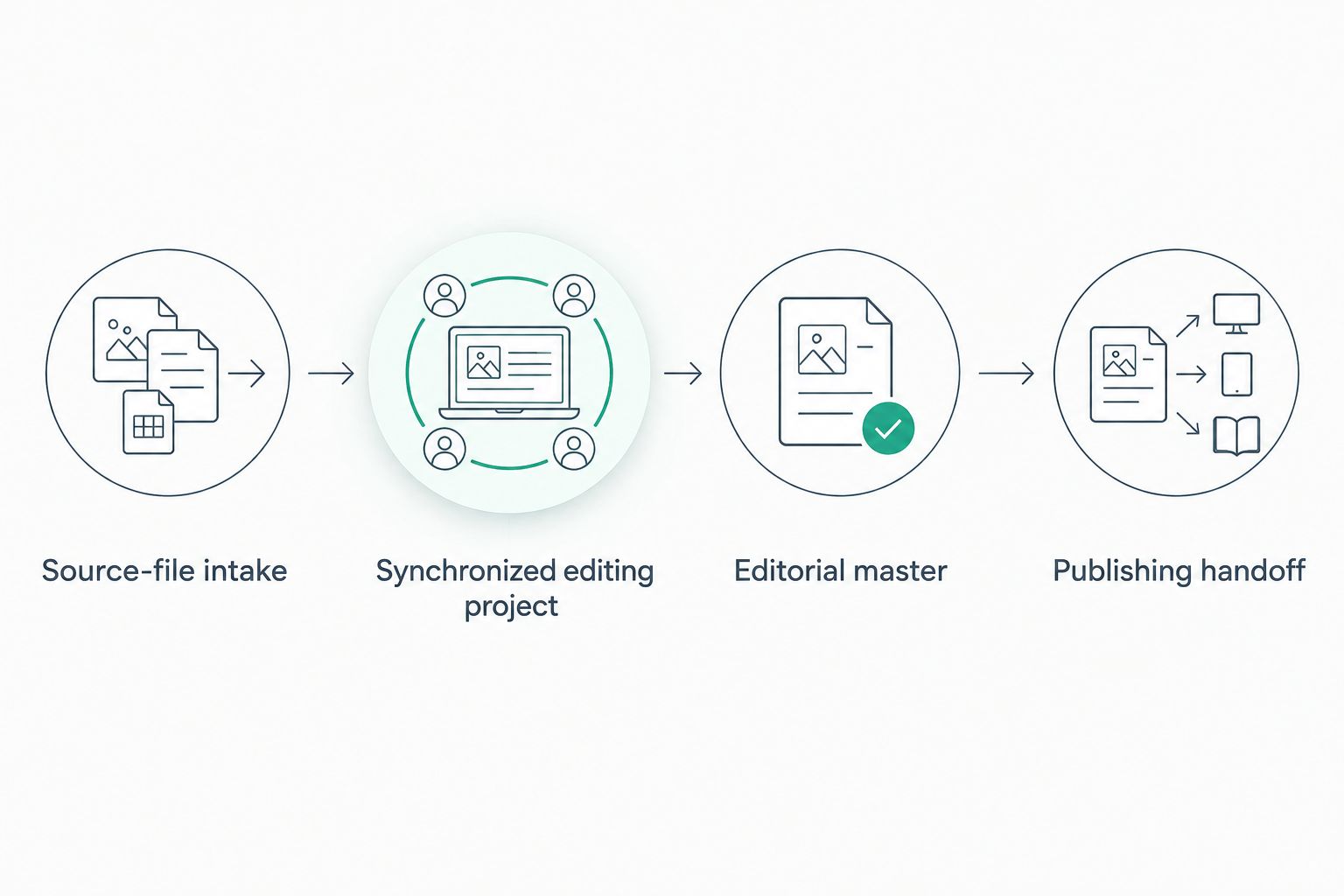
Verify the source and synchronization before committing to editorial cuts.
Expected result: You have an approved episode that preserves the speaker's meaning, sounds consistent, and carries the correct visual information.
Do not polish a passage you already intend to remove. Structural decisions belong before detailed sound repair, caption correction, and camera-cut refinement. That order prevents you from finishing work that never reaches the published episode.
If application choice is still blocking production, use the audio editing software guide for podcasters to assess your editing needs. Choose around your actual audio, video, and collaboration requirements—not a feature list you will not use.
Expected result: Your episode is published in the intended places, and the public version matches what you approved.
Keep editing delivery and publication as separate milestones. Dialed Studios guarantees 48-hour editing turnaround; account access, your approval, and release scheduling still need named owners in your workflow.
Plan your next podcast production
Discuss fully customized branded sets, dedicated production support, and guaranteed 48-hour editing turnaround.
The adjacent workflow starts with the approved master, not a fresh edit of the raw recording. That keeps promotional content aligned with the version your audience can actually watch or hear.
Expected result: You have promotional assets that support the episode without introducing a competing version of its message.
For your 2026 clip workflow, keep episode approval as the gate. An early cut is useful for identifying candidates, but it should not become the source of published promotional assets after the master changes.
Check that the timeline frame rate matches the footage and that the audio files are interpreted correctly. Resynchronize the affected recording and verify the end before continuing; moving the entire track fixes an offset, not ongoing drift.
Mute camera scratch audio and duplicate microphone tracks, then listen again. If several microphones capture the same speaker, inspect the overlap before adding more processing. Doubling is not solved by making the combined signal louder.
Reduce the processing strength and compare against the original. Treat isolated distractions separately where possible. Preserve intelligible speech rather than chasing complete silence at the expense of the voice.
Return to the designated approver and request a consolidated list tied to the current review export. Mark superseded versions clearly. Do not combine instructions from different cuts without checking which edit each note describes.
Confirm that they were generated from the approved export rather than an earlier cut. Rebuild timing after structural changes, then check the uploaded result. A correct local file does not replace a public playback check.
Expand the process only after the core handoff is repeatable. Add fields to your episode brief for guest approvals, supporting documents, recurring segments, or channel-specific deliverables when those requirements actually apply.
For a business podcast, make content strategy part of intake. Define the audience problem before recording, then use that goal to choose which explanations stay in the edit and which passages become clips.
The benefit of fully customized branded sets is a deliberate visual starting point. Pair that with a dedicated producer and engineer so production decisions support the episode rather than becoming tasks you solve while interviewing.
What is the best podcast editing workflow for a business owner?
The best podcast editing workflow separates intake, synchronization, editorial approval, and publishing. Assign an owner to each stage and define deliverables before editing starts.
Should I edit podcast audio or video first?
Synchronize audio and video first, then make structural edits together. Finish detailed sound processing and picture polish after the conversation's structure is settled.
Do I need to remove every pause and filler word?
No. Remove distractions that interfere with meaning, but retain pauses and breaths that make the conversation sound natural.
Does a 48-hour editing turnaround mean my episode is published in 48 hours?
Editing turnaround and publication are separate milestones. Confirm the guarantee's scope and starting point, then assign responsibility for approval, uploading, and release scheduling.
Can I create podcast clips before the full episode is approved?
You can identify candidate passages early, but create final promotional exports from the approved master. This keeps clips consistent with the released episode.
What should I send a podcast editor?
Send verified source recordings, an episode brief, approved graphics, pronunciation notes, removal instructions, and a deliverables list. Include a single approval contact and the intended publishing destinations.
How do I check a podcast episode before publishing?
Play the rendered delivery files and check sound, synchronization, transitions, captions, graphics, and the ending. After publication, inspect the public episode as a separate check.
Approval belongs to a specific export, not an episode title. Record the approved filename alongside the approval message. If the timeline changes afterward, identify the new export and review the affected material before release.
Make that the final rule in your 2026 podcast editing workflow. A clearly identified master gives your editor, publisher, and promotional team the same source of truth.