Studio recording to LinkedIn thought leadership: 2026 workflow
Use this podcast to linkedin content workflow to turn studio recordings into clear business posts, captioned clips, and an approval process you can repeat.
.svg)
.svg)
Instead of manually replaying every podcast to find a LinkedIn post, build a podcast to LinkedIn content workflow that moves approved recordings through transcript review, claim selection, editing, and publishing. You get posts built around your actual expertise, with a named owner at each handoff—not a folder of clips nobody publishes.
TL;DR
A podcast recording captures a conversation. A LinkedIn post needs a complete argument that makes sense without that conversation. Repurposing works when you rebuild the context, not when you paste the transcript.
For your 2026 publishing plan, connect recording decisions to the questions your buyers ask. An episode about business growth is broad; an explanation of why you declined a poorly matched client gives you a specific decision to discuss.
Dialed Studios is best for entrepreneurs who want done-for-you podcast production rather than a room rental. Its offering includes fully customized branded sets, a dedicated producer and engineer, editing, content strategy, and a guaranteed 48-hour editing turnaround. You still need to approve the meaning of your statements and decide who publishes them.
Create one shared tracking sheet. The field names below are labels you create for this workflow, not settings inside LinkedIn or a required software product. Use your existing file storage and document tools rather than introducing another platform just to track approvals.
As a practical starting point, prepare 3 buyer questions per session and reserve 10 minutes for clean retakes. These are planning choices, not promised output volumes. Expand the brief only when you can support each additional answer with something useful.
Dialed Studios podcast production includes a dedicated producer and engineer. Use that support to discuss the recording brief and technical execution while you concentrate on explaining your decisions.
Expected result: Your recording contains self-contained answers tied to buyer questions, and the production team knows which visual assets you intend to publish.
For your first 2026 batch, select 2 candidate ideas per episode. That limit is an editorial starting point: it forces you to choose complete arguments instead of treating every interesting sentence as a publishable asset.
Do not approve a candidate because it sounds confident. Ask whether a reader can identify the problem, understand your answer, and see why you reached it. If any part is absent, return to the recording or reject the candidate.
Expected result: Every selected idea has a traceable source, a clear claim, an approval state, and a responsible person.
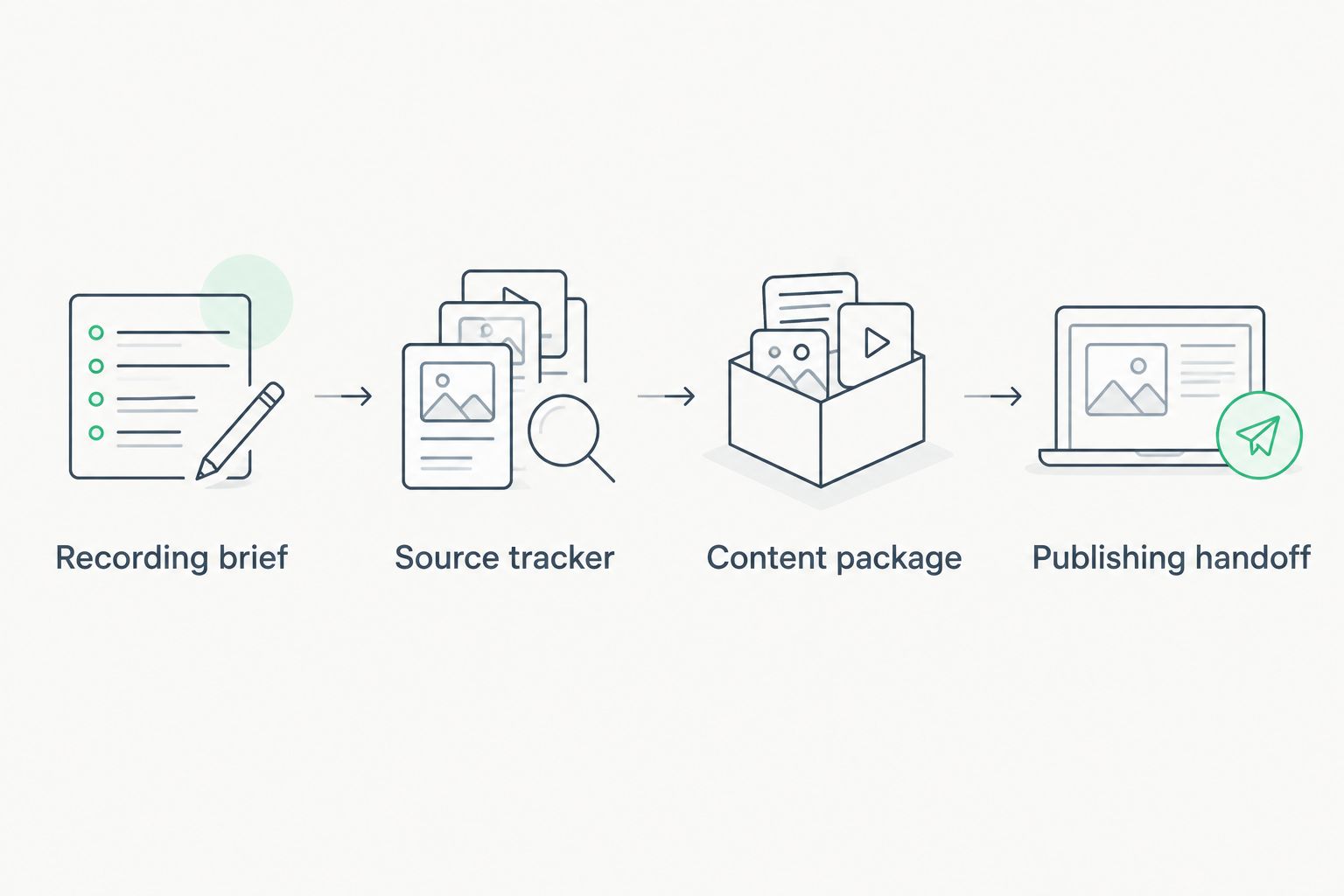
Approve the source and its meaning before handing content to the publisher.
Choose the format according to what carries the explanation. For this 2026 workflow, use text when the argument can stand on its own and video when delivery, demonstration, or conversation adds meaning.
LinkedIn text post
Captioned video clip
Do not turn an edited paraphrase into a direct quotation. Keep quotation marks for words the speaker actually said. When you change the wording, present the result as post copy and obtain the speaker's approval.
Dialed Studios offers a guaranteed 48-hour editing turnaround, but your workflow must also account for factual review and publishing ownership. Confirm which agreed deliverables the turnaround covers before setting your content calendar.
Expected result: You have either a standalone text post or a captioned clip with supporting copy, and the speaker has approved the argument—not just the appearance.
Treat scheduling as a separate action. If you use a scheduler, confirm its destination, time zone, media support, and account permissions before placing approved content in its queue. This workflow does not require automated publishing.
The 2026 operating rule is simple: only approved content enters the publishing queue. A scheduled slot is not a reason to publish a claim that still needs review.
Expected result: The correct account publishes the approved version, and your tracker identifies what went live.
A useful adjacent workflow starts with a substantive reader question rather than another recording. Use it when someone challenges an assumption, asks for an example, or describes a different situation.
Expected result: Audience questions become new editorial briefs without weakening the original source trail. This gives your 2026 content plan a feedback loop based on actual questions, not assumed interests.
Return to the source and include the sentence that identifies the subject. If the longer excerpt loses focus, use a text post instead. Do not add an opening that makes the speaker appear to answer a question they never addressed.
Check the disputed passage against the recording and correct the transcript before editing. Carry that correction into captions and post copy. Fixing the source document alone does not fix files already exported from it.
Check account access and assign the publishing owner before the recording session. For a business Page, verify that the intended publisher has the necessary permission. Do not solve access problems by sharing personal account credentials.
Pause or remove the queued item, update the source record, and replace the attachment or copy. Mark the earlier version as superseded. The publisher needs an explicit new approval, not an informal message saying the edit looks better.
Replace the episode overview with one decision and its explanation. Remove the list of topics discussed. A reader should understand your position without listening to the podcast first.
Start with one destination and one approval route. Add formats only after you can reliably identify the source, approve the claim, and publish the correct version.
For business coaches, connect each episode to the objections and decisions addressed in your client conversations. Use the content strategy for business coaches guide to develop the editorial brief before expanding the publishing calendar.
Dialed Studios pairs fully customized branded sets with a dedicated producer and engineer, editing, and content strategy. That suits founders who want production support rather than responsibility for the entire recording setup. The trade-off remains operational: you must provide subject expertise, approve sensitive claims, and assign publishing ownership.
Plan your recording workflow
Discuss customized branded sets, dedicated production support, and the guaranteed 48-hour editing turnaround.
What's the best podcast to LinkedIn content workflow for a founder?
Use a source-tracked workflow: record buyer-focused answers, select complete claims, prepare text or video, approve the meaning, and publish from the correct account. Keep an owner and source timestamp attached to every asset.
Should I publish a LinkedIn text post or a podcast clip?
Use a text post when the argument works without the recording, and a clip when delivery or demonstration adds meaning. Neither format removes the need for factual review and enough context to understand the claim.
Can I automatically publish every clip from a podcast?
Do not automatically publish unreviewed clips. Confirm source accuracy, guest permission, captions, destination, and approval before placing content in a publishing queue.
Does the 48-hour editing guarantee include LinkedIn publishing?
Do not treat Dialed Studios' guaranteed 48-hour editing turnaround as a LinkedIn publishing deadline. Confirm the agreed editing deliverables and assign separate responsibility for approvals and publication.
How many LinkedIn posts should I make from one episode?
Start by selecting two candidate ideas, then publish only those that form complete, supported arguments. This is a planning recommendation, not a promised yield from every recording.
Do I need video to turn a podcast into LinkedIn content?
No, an approved audio recording and checked transcript can support text posts. A video clip requires video source material, and its framing and captions need review before publication.
Who should approve LinkedIn posts based on a guest interview?
Assign an approver who can verify the speaker's meaning and permission to use the material. Follow the consent arrangement established with the guest, and resolve sensitive claims before publication.
Keep rejected excerpts in the tracker with a reason. An incomplete answer, confidential example, or unsupported claim tells you what the next recording needs to address. Rejection becomes a better interview question instead of another abandoned file.