Can real estate agents use a podcast studio for property video?
Use a podcast studio for real estate property video to record agent intros and narration. Learn when you still need location footage and how to plan.


Yes, real estate agents can use a podcast studio for property video to record listing introductions, property commentary, voiceovers, and buyer questions. The studio captures your presentation, not the property itself: walkthroughs and footage of rooms, outdoor spaces, and surroundings still need to be filmed on location.
TL;DR
Use a podcast studio for the explanation and property footage for the evidence. You can introduce a listing, explain its layout, answer questions, or record narration in a studio. You cannot demonstrate a home's condition or room connections without showing the actual property.
The right approach depends on what viewers need to understand. For the broader production plan, see the video production guide for real estate agents.
Studio recording
Location recording
Combined production
These are production approaches, not interchangeable substitutes. Choose the studio when the viewer needs your explanation. Choose location filming when the viewer needs to see the space. Combine them when the video needs both.
A listing video and an agent-brand video serve different purposes. A listing video helps someone understand a particular property; an agent-brand video explains your approach, experience, and services. Mixing those purposes without a clear structure makes the message harder to follow.
For your 2026 content plan, identify the viewer's question before choosing the recording location. Someone asking how the kitchen connects to the living area needs property footage. Someone asking how you prepare sellers for filming needs a clear explanation from you.
A fully customized branded set supports your identity; it does not replace visual proof. Keep the property visible whenever the script makes a claim about its features, layout, or condition.
Studio recording works when your knowledge is the subject. You can explain a property's documented features, introduce a listing, discuss the selling process, or answer recurring buyer questions without presenting from inside the home.
Prepare each segment around a clear job. An introduction tells viewers what they are about to see. Commentary explains a detail they can see in the accompanying footage. A closing statement tells them how to request more information.
The advantage is control over your presentation. The limitation is context: a studio shot alone cannot establish what a room looks like or how spaces connect. Keep descriptions specific and pair property claims with matching visuals.
Avoid turning the recording into a long sales speech. If the useful information is the layout, explain the layout. Your name and branding should support that information rather than delay it.
Location footage is the right choice when the property itself must answer the question. Show the approach, entry, room connections, outdoor areas, and relevant details rather than expecting narration to carry the entire explanation.
Plan shots around the claims in your script. If you describe a connection between the kitchen and dining area, capture that connection. Separate close-ups do not necessarily explain how the rooms relate.
The advantage is direct visual context. The limitation is the preparation required at the property, including access, readiness, and permission to film. Confirm those arrangements before building your recording schedule.
Do not present a studio backdrop as though it were part of the listing. The distinction between your branded presentation space and the actual property should remain clear throughout the edit.
Combined production gives your explanation a place alongside footage of the home. You can open on camera, move into property visuals while your narration continues, and return on camera for the closing instruction.
That structure gives each element a specific role. Your presentation explains significance; property footage shows the underlying detail. Neither should contradict the other.
The trade-off is coordination. A polished studio recording cannot fix missing footage of the feature you describe. Approve the shot list and script together, not as separate assignments.
For a 2026 listing campaign, also separate property-specific segments from reusable agent introductions. Keeping those recordings distinct makes it easier to identify what belongs to a particular listing and what supports your broader brand.
Build the production around the viewer's question, then decide what needs to be recorded in each setting. Use the following sequence to keep the studio session connected to the finished video.
The sequence matters because script changes affect the footage you need. Resolve the message before treating the recording as finished.
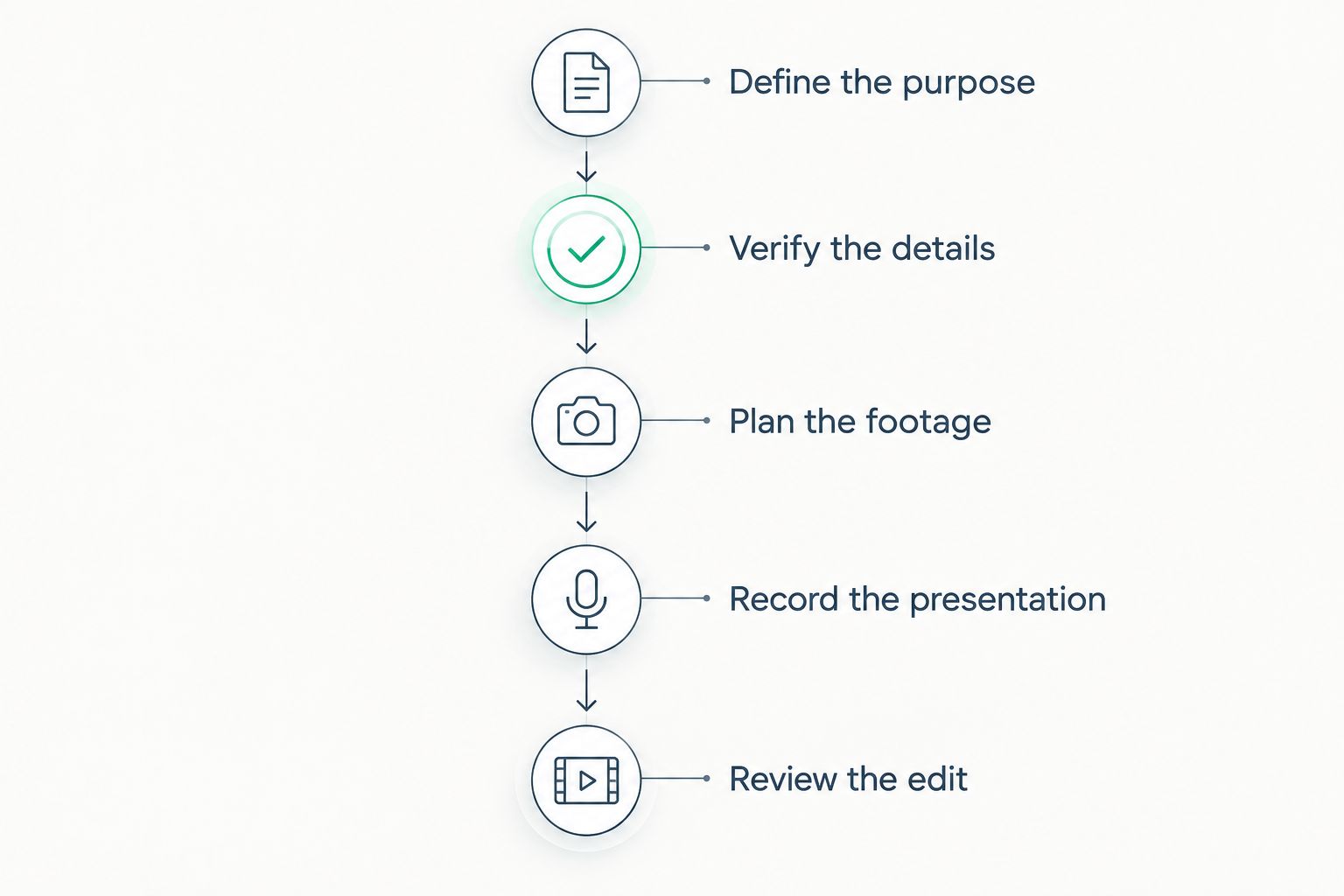
Match the script to the property footage before recording your presentation.
A script should not promise a visual the editor cannot supply. Review the footage before recording final narration whenever the explanation depends on a specific room, view, finish, or connection between spaces.
Use plain descriptions. Explain what viewers are seeing, why it matters to the property, and what they should ask about next. Avoid unsupported claims about investment performance, future changes, or buyer outcomes.
Identify the intended destination, orientation, captions, branding requirements, and closing instruction before editing begins. List the source files and explain which property visuals belong with each segment.
For your 2026 production brief, distinguish required deliverables from ideas for later content. A full listing video, a standalone agent introduction, and a buyer-question clip are different edits. Agree on the work rather than assuming every format is included.
The choice between studio, location, and combined recording follows the content requirements. Use these factors to decide what belongs in your brief:
Do not choose equipment before resolving these decisions. The production plan should determine what needs to be captured, who captures it, and how it reaches the final edit.
Dialed Studios is best for Denver agents who want done-for-you studio video production rather than a room rental. The service includes fully customized branded sets, studio equipment, a dedicated producer and engineer, editing, and content strategy.
That distinction matters when you want to focus on presenting rather than coordinating the recording yourself. Dialed Studios positions the studio session as part of a production service, with a guaranteed 48-hour editing turnaround.
The boundary remains important: studio production does not itself document a property's rooms or exterior. Bring location footage into the production plan and confirm the scope of the finished video before booking. Do not assume location filming is included in a studio service.
For a 2026 listing schedule, discuss how the guaranteed 48-hour editing turnaround applies to your agreed deliverables. Establish what must be supplied before editing and how approvals and revisions fit the schedule. Keep the promise tied to the work you have agreed to produce.
Plan your real estate video
Discuss fully customized branded sets, dedicated production support, and the guaranteed 48-hour editing turnaround.
Yes, provided you have permission to use the footage and it meets the requirements of the planned edit. Confirm usage rights and send the files for review before recording narration around them.
Do not assume a file is usable simply because it plays on your phone. Ask the production team to check the supplied material against the intended deliverables before you finalize the script.
No, you do not need a podcast series to use a studio for video production. A listing introduction, agent profile, or narrated property explainer is a standalone video project.
Describe the deliverable directly when discussing the booking. Ask for video production that fits the assignment rather than treating a podcast episode as the required format.
Yes, you can plan separate agent-brand segments alongside property-specific recordings. Keep the topics and scripts distinct so each finished piece has a clear purpose.
A reusable introduction should not contain listing details that make it unsuitable for other content. Keep changing property information inside the listing-specific segments.
Can I use a podcast studio for real estate property video?
Yes, a podcast studio for real estate property video works for agent introductions, commentary, voiceovers, and buyer education. Record the actual home on location when viewers need to see its rooms, layout, or exterior.
Is a podcast studio better than filming at the property?
A podcast studio is better suited to your presentation; filming at the property is better suited to showing the home. Combine them when the video needs both explanation and visual evidence.
Does a branded studio set replace property footage?
No, a branded studio set does not replace footage of the actual property. Keep the distinction clear so viewers understand which space belongs to the listing.
What does Dialed Studios provide for real estate video production?
Dialed Studios provides fully customized branded sets, studio equipment, a dedicated producer and engineer, editing, and content strategy. Confirm the scope of your property-video deliverables before booking.
How quickly does Dialed Studios edit recorded content?
Dialed Studios offers a guaranteed 48-hour editing turnaround. Confirm how that guarantee applies to the agreed deliverables and how approvals and revisions fit your schedule.
What should I prepare for a property-video session in 2026?
Prepare an approved script, verified property details, a footage plan, and a clear list of editing deliverables. Confirm permissions for any supplied footage before using it.
Review the video without sound before approving it. If the visuals do not show the property features your narration describes, the edit needs different footage or a narrower script.
Make that part of your 2026 approval process. Then listen without watching: the explanation should still be accurate, clear, and free of claims the property footage cannot support.