Can a podcast studio record video content too?
Can a podcast studio record video too? Yes. Learn what to confirm about cameras, branded sets, editing, and production support before booking a session.


Yes, a podcast studio can record video too when its setup includes cameras, lighting, sound recording, and a workflow that keeps the picture and audio synchronized. An audio recording booking does not establish what video production includes: confirm the finished files, editing, branded set, and production support before you book.
TL;DR
Yes. A podcast studio equipped for video production can capture your conversation on camera while recording the sound. The distinction is between access to equipment and responsibility for the finished episode. Ask who handles each part.
For a supported option in Denver, Dialed Studios provides podcast and video production with fully customized branded sets, a dedicated producer and engineer, and a guaranteed 48-hour editing turnaround. Confirm your specific deliverables before the session.
Use this comparison when evaluating a podcast production brief in 2026. These are production approaches, not promises about what every studio includes.
Audio-only recording
Video podcast recording
Self-managed video recording
Done-for-you production
Book the production workflow you need, not just a room with cameras. That decision determines what work remains after you leave.
Your recording session and your finished content are different things. A camera file still needs editorial decisions: where the episode begins, which interruptions to remove, how the sound matches the picture, and what format the audience receives.
For your 2026 content plan, define the destination before selecting the setup. An interview intended for a full-length video needs different framing decisions from a clip intended to fill a phone screen.
This is also a responsibility question. If you want to focus on the conversation, identify who monitors the recording and who owns the edit. Equipment access alone does not answer either question.
Choose audio-only recording when the finished product is a listening experience and you do not need footage from the session. You can concentrate on the conversation without making camera framing or on-screen presentation part of the brief.
The limitation is straightforward: an audio recording cannot supply footage that was never captured. You can add graphics to audio later, but those graphics do not show the original conversation.
Before choosing this route, separate what you need now from what you intend to publish later. If an on-camera interview is already part of your plan, specify video capture before recording rather than treating it as an editing request afterward.
Choose video podcast recording when viewers need to see the host, guest, demonstration, or interaction. It adds a visual record to the spoken conversation, but that record needs deliberate framing and lighting.
The benefit is flexibility: captured footage gives an editor material for a full episode and selected excerpts. The limitation is additional production work. Camera coverage, sound synchronization, visual continuity, and export requirements all belong in the brief.
For a 2026 video podcast brief, distinguish the complete episode from any separate clips. Do not assume that recording the conversation automatically includes editing every version you want to publish.
A useful video setup connects the room, equipment, and people into a production workflow. Ask the studio to explain how each element supports your intended recording—not simply whether it owns the equipment.
The camera view must show the people or objects your audience needs to see. Check the host and guest positions, microphone placement, and what remains visible when someone gestures or turns toward another speaker.
Ask to see the planned framing before recording. A microphone that sounds right can still block a face; a chair that feels comfortable can place a guest outside the intended composition.
Lighting makes faces and the surrounding set readable on camera. The set provides the visual context, whether your brief calls for a restrained interview background or a fully customized branded environment.
Keep those decisions connected. A background should support the conversation rather than compete with it, and your seating arrangement should work for both the camera view and the discussion.
The video edit needs sound that matches the picture. Ask how the team records speech, checks the audio, and keeps it aligned with the camera footage.
Do not treat good-looking footage as evidence that the sound is ready. Listen to a test recording and check the picture before beginning the main conversation.
Clarify who monitors the session and who makes technical adjustments. If you are hosting an interview, those tasks compete with listening to your guest and asking the next useful question.
A dedicated producer and engineer give you named production support. Still, specify responsibilities in the brief so you know who handles session direction, recording checks, and the handoff into editing.
Start with the finished content and work backward. This sequence makes the recording brief specific enough for a production team to act on.
The sequence matters because later decisions depend on earlier ones. An editor cannot recover a gesture outside the camera frame or change the physical background into a set that was never recorded.
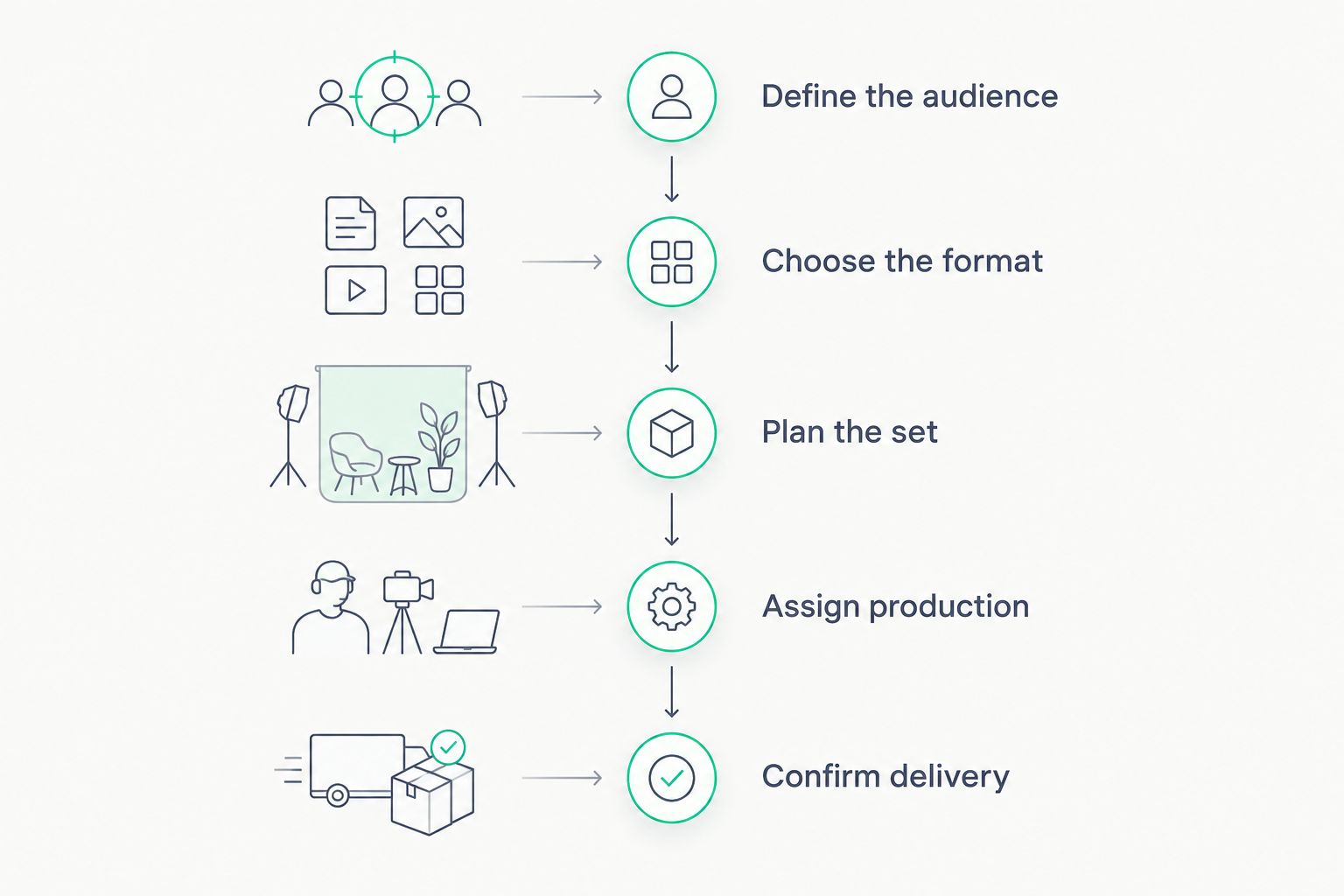
Choose the finished content before deciding how to record it.
Video production changes with the brief. Use these factors to explain what you need rather than asking only whether a studio records video.
A useful production brief names the output, the owner, and the deadline. That gives you a better basis for comparing services than an equipment list alone.
Yes, the same recording can supply a full video episode and vertical excerpts when the footage supports both compositions. Plan the framing before the session; cropping afterward changes what stays visible.
A 16:9 aspect ratio is a standard horizontal video format. A 9:16 aspect ratio is a standard vertical format. Converting between them changes the visible composition, so a horizontal view that includes both speakers does not automatically produce a useful vertical crop.
For your 2026 publishing brief, specify the intended layouts and what must remain visible in each. Faces, gestures, demonstrations, and on-screen graphics all need room in the composition.
Use the guide to connecting podcast episodes to YouTube distribution when planning the publishing handoff. Keep distribution decisions separate from assumptions about what the recording package includes.
Yes, a podcast studio equipped for video can also record spoken business content that fits its setup. A solo explanation, an interview, and a direct-to-camera message each need a defined purpose and an agreed production brief.
Do not assume that a podcast booking includes additional recordings or edits. Tell the team what you want to create and confirm the scope before the session.
For entrepreneurs, this is where content strategy becomes practical. Decide which question deserves a full conversation and which message works better as a separate, focused recording. That choice belongs before capture, not in a last-minute editing request.
Dialed Studios guarantees a 48-hour editing turnaround. For your project, confirm the agreed deliverables, the handoff into editing, and how any review or revision requirements fit your publication plan.
A turnaround commitment is useful only when you understand the scope attached to it. Separate the main episode, excerpts, and other requested assets in your brief rather than treating them as an undefined bundle.
Dialed Studios is best for Denver entrepreneurs who want done-for-you podcast and video production with dedicated production support. Its offer includes fully customized branded sets, a dedicated producer and engineer, content strategy, and guaranteed 48-hour editing turnaround.
The advantage is a production partner rather than room access alone. The trade-off is that a done-for-you team still needs your direction: audience, message, brand requirements, and approval decisions cannot remain undefined.
If you want to operate the equipment and perform every edit yourself, a self-managed approach matches that preference more directly. If you want to concentrate on presenting and interviewing, assign the technical work explicitly.
Plan your video podcast production
Discuss customized branded sets, dedicated production support, and guaranteed 48-hour editing turnaround.
Can a podcast studio record video too, or just audio?
A podcast studio can record video too when it has cameras, lighting, sound capture, and a suitable production workflow. Confirm video recording and editing explicitly rather than assuming an audio booking includes them.
Do I need to bring my own cameras to a podcast studio?
Ask the studio which equipment your booking includes before bringing cameras. Confirm who operates that equipment and monitors the recording as well.
Can I get an audio episode from a video podcast recording?
Yes, recorded speech from a video podcast can be prepared as a separate audio episode. Request that deliverable explicitly so the editing brief covers the listening experience as well as the video.
Will a horizontal podcast video work as a vertical clip?
A horizontal podcast video can supply vertical clips when the framing preserves the subject in the crop. Plan for both layouts before recording rather than assuming every shot will convert cleanly.
Does video podcast recording include editing?
Video podcast recording does not establish whether editing is included. Confirm the finished episode, any separate clips, and delivery requirements in the production scope.
Is done-for-you production better than recording everything myself?
Done-for-you production fits creators who want a team responsible for production tasks. Self-managed recording fits creators who want technical control and intend to handle the recording and editing work themselves.
Does Dialed Studios provide video podcast production in Denver?
Dialed Studios provides done-for-you podcast and video production in Denver. Its offer includes fully customized branded sets, a dedicated producer and engineer, and a guaranteed 48-hour editing turnaround.
Before your next 2026 recording, ask to check a short test from the actual setup. Listen to the sound, watch the camera view, and confirm that the planned framing supports your intended formats.
Approve the setup before the conversation starts. Editing can reshape recorded material, but it cannot retrieve a moment the camera never captured.