Video production for nonprofit organizations: complete 2026 guide
Video production for nonprofit organizations starts with a clear donor action. Plan consent, filming, editing, and approvals without losing your mission.

.svg)
.svg)
Nonprofit video production is the planning, filming, and editing of mission-led stories with the aim of turning attention into donations, volunteer applications, or program participation. This guide to video production for nonprofit organizations shows you how to define the ask, protect participants, and deliver content your team can publish; your production plan must account for consent, factual accuracy, and approval responsibilities—not just the shoot.
TL;DR
Your video needs to answer a practical question: what should someone understand, believe, or do after watching? A donor appeal, volunteer recruitment video, and program explanation require different stories. Giving them the same script leaves the viewer with competing instructions.
For your 2026 content plan, separate the communication job from the production method. A staff member explaining eligibility needs clear language and accurate instructions. A participant describing their experience needs control over what becomes public. A fundraising appeal needs an explicit connection between the story and the requested support.
Choose the production setup after you define the audience action. A polished recording cannot repair an unclear ask or an unsupported claim. Use a written brief to keep staff, board reviewers, participants, and production partners aligned.
If you are comparing local production teams, the guide to video production companies in Denver for small businesses provides a separate vendor-selection starting point. For nonprofit work, add participant protection and mission accuracy to your selection criteria.
Build the project around a sequence your team can approve: outcome, consent, responsibilities, recording, editing, release, and measurement. Start with a shared document and a named owner for each decision. Hiring production support changes who executes the work; it does not remove your responsibility for the message.
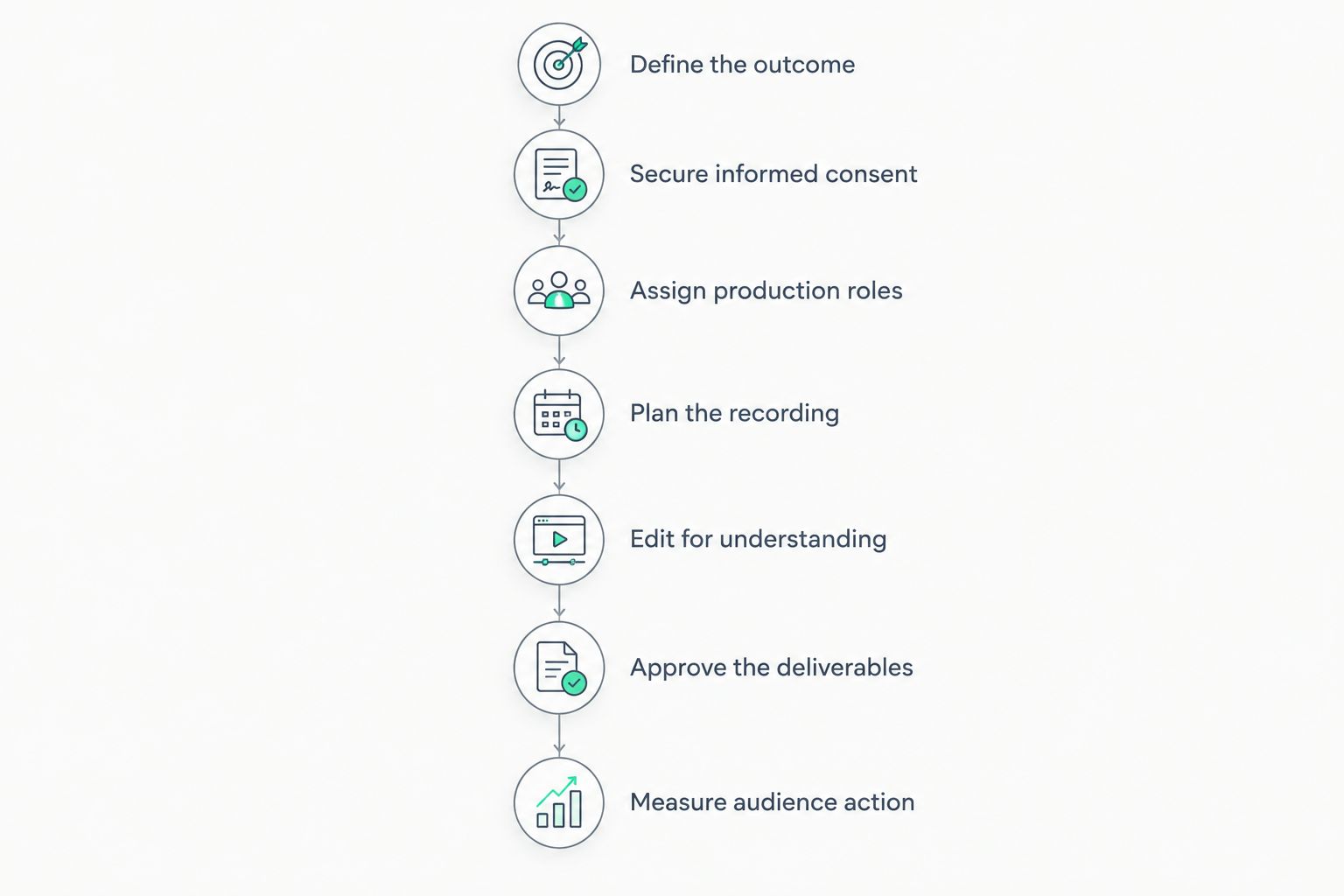
Resolve the message and permissions before committing to a recording plan.
Start manually with a brief that fits on 1 page. Name the audience, the question you will answer, and the action you want. Write the closing request before drafting the opening; it exposes stories that sound compelling but do not support the campaign.
For a 2026 fundraising video, distinguish between explaining the mission and requesting support for a particular initiative. Do not imply that every contribution funds a specific activity unless your organization has approved that statement. Your finance or program lead should verify the wording.
Choose one primary action for each finished video. You can build separate versions for donors, volunteers, and program participants rather than forcing every audience into the same edit.
Create a permission checklist before inviting anyone on camera. Explain where the recording will appear, how it will be edited, and whether shorter clips will be published separately. Make participation a real choice rather than a condition attached to receiving services.
Use your organization's approved consent process and obtain appropriate legal guidance for children, sensitive information, or protected identities. A signed document does not replace a clear conversation. Participants should understand the intended use in language they can follow.
Decide what cannot be filmed. That includes identifying details in the background, documents on desks, conversations outside the interview, and locations that reveal someone's circumstances. Carry those restrictions into the editor's brief.
For a self-managed shoot, list the jobs before assigning people: interviewer, camera operator, sound monitor, editor, and approval owner. Test the setup with a staff member. Listen to the recording rather than assuming a microphone is working because its indicator is on.
If your team needs production handled for you, Dialed Studios offers video production in Denver with a dedicated producer and engineer, fully customized branded sets, editing, and content strategy. That is a done-for-you production team, not simply a room rental.
Dialed Studios video production is best for Denver teams seeking branded studio content with dedicated production support. Your nonprofit still owns participant permissions, program facts, and final message approval. A studio setup also needs a separate plan when the story depends on showing work in the community.
Build a recording outline in a shared document before writing a word-for-word script. For interviews, use prompts that invite concrete experiences: what happened, what changed, and what the participant wants viewers to understand. Do not coach someone into delivering an impact claim they cannot personally support.
Prepare a 60-second opening explanation as a rehearsal target, not a universal video length. Ask a colleague unfamiliar with the program to summarize it afterward. Rewrite any language that requires an internal acronym or lengthy clarification.
For studio interviews in 2026, Dialed Studios offers fully customized branded sets. Use the set to establish the organization's identity while keeping the speaker and message central. Bring approved terminology and visual requirements; do not expect the production team to infer them.
Begin the manual review with the transcript. Remove repetition, internal jargon, and statements that need unsupported context. Keep the meaning of each speaker's answer intact; rearranging a sentence must not turn a qualified statement into an absolute claim.
Build a 30-second cut as a planning exercise for a short campaign message. If the essential explanation cannot fit without distortion, use a longer format. Duration serves the story, not the other way around.
Add captions and inspect them against the audio. Check speaker names, program terms, and donation instructions carefully. If important information appears only visually, plan how viewers who cannot see it will receive that information.
Create a review checklist and a single feedback document. Separate factual corrections from creative preferences so the editor can see what must change. Resolve disagreements internally before sending contradictory instructions to your production partner.
For your 2026 campaign schedule, distinguish editing turnaround from permission to publish. Dialed Studios provides a guaranteed 48-hour editing turnaround. Your team still needs to approve factual accuracy, participant treatment, captions, and the final request; confirm the guarantee's scope when agreeing to the project.
Do not schedule publication solely around the edit delivery date. Give the approval owner a complete package to review, including the main video and any separate clips. An approved interview does not automatically settle every decision about its shortened versions.
Start with the reporting already available in your website, campaign, and publishing systems. Connect the video to the relevant next step: a donation form, registration page, volunteer application, or inquiry process. Track completed actions separately from views.
Do not assign every campaign result to the video when email, events, outreach, and paid distribution also contributed. Use tagged campaign links and consistent reporting definitions to make comparisons clearer. The point is to understand where viewers stop, not to manufacture an attribution claim.
Review the message as well as the numbers. If staff repeatedly answer the same question after publication, the video needs a clearer explanation. If viewers reach the destination but do not complete the action, inspect that destination before commissioning another shoot.
Choose the option that covers the work your team cannot reliably own. Self-managed production gives you direct control but leaves recording, editing, and review coordination with staff. A room rental changes the setting; a production partner changes who handles the technical work.
The comparison below separates studio content from location-dependent storytelling. Select on responsibility and story fit, not equipment access alone. Ask each provider to define the deliverables, revision process, permissions responsibilities, and handoff requirements in writing.
Self-managed recording
Room-only studio rental
Freelance production crew
Dialed Studios done-for-you production
Location-based documentary production
Do not ask a studio interview to prove something only field footage can show. Likewise, do not arrange a location shoot when the entire job is a clear explanation from your executive director. Match the setting to the evidence the viewer needs.
Plan your studio production
Discuss fully customized branded sets, dedicated production support, and the guaranteed 48-hour editing turnaround.
Permission to record is not permission to use every detail in every context. Explain the intended edits and publication channels before filming. Keep sensitive disclosures out of promotional clips when those disclosures are outside the agreed use.
A participant's experience illustrates that person's experience. It does not establish an organization-wide result. Pair program-wide claims with approved evidence, and keep testimonial language faithful to what the speaker actually said.
An editor cannot invent the approved use of donations or decide which campaign your board intends to support. Write the request in the brief. Have the responsible staff member approve it before recording the closing lines.
Board members, program staff, and communications staff bring different responsibilities. Collect their input through one approval owner. Send the editor a resolved instruction, not a collection of competing preferences.
A finished video still needs captions, an approved destination, publication ownership, and a response process. Check the donation or registration journey before launch. A compelling closing request is wasted if the next step is unclear or broken.
What's the best way to start video production for nonprofit organizations?
Start with a written brief naming the audience, the message, and one intended action. Define permissions and approval responsibilities before choosing a recording setup.
Should a nonprofit film in a studio or on location?
Use a studio for controlled interviews and explanations; use a location when the environment is essential to the story. Check participant and background permissions before planning either shoot.
Is done-for-you production better than renting a studio?
Done-for-you production fits teams that need someone to manage technical recording and editing. Room rental fits teams that can already assign and execute those responsibilities.
Does Dialed Studios offer support beyond a recording room?
Dialed Studios offers done-for-you podcast and video production in Denver, including fully customized branded sets, a dedicated producer and engineer, editing, and content strategy. Its guaranteed 48-hour editing turnaround is separate from your nonprofit's internal approval process.
How long should a nonprofit fundraising video be?
Make a nonprofit fundraising video long enough to explain the need and the requested action without repetition. Choose the length around the story and publication channel rather than treating a duration as a performance guarantee.
What permissions does a nonprofit need before filming participants?
Use an approved consent process that explains recording, editing, distribution, and separate clip use. Obtain appropriate legal guidance for children, sensitive disclosures, and protected identities.
How do we measure whether a nonprofit video worked?
Measure the action the video requested, such as completed donations, registrations, or volunteer applications. Keep views and destination visits separate, and account for other campaign activity when interpreting results.
Before approving your 2026 video, watch it without the opening organizational introduction. Does the remaining story explain the need, respect the participant, and tell the viewer what to do? If not, rewrite those parts before adding more footage.
Then test the destination yourself. Follow the published request through to its final step. Your video and the action it requests are one communication job. Approve them together, rather than treating the finished edit as the finish line.